A business can have a professional website, a reliable team and a growing customer base yet still face a serious cybersecurity weakness. An employee might lose access to an email account, a software update might be overlooked, or confidential customer information might be shared with the wrong person.
These problems can interrupt operations, damage customer confidence and create expensive recovery work. For businesses that depend on websites, mobile applications, cloud services and digital payments, protecting technology is part of protecting the business itself.
The right cybersecurity solutions for businesses do not necessarily involve buying the most expensive software. They begin with understanding what needs protection, identifying the most important risks and choosing controls that the organisation can maintain.
A small business might start by securing email accounts, updating its website and testing backups. A larger organisation may also need centralised monitoring, vulnerability management and a formal incident response process.
This guide explains the security options available, how to compare providers, what affects costs and how to turn cybersecurity from a general concern into a practical business plan.
Why Cybersecurity Solutions Matter for Businesses
Cybersecurity protects the accounts, systems, applications and information a company needs to operate.
Consider an online retailer that relies on a website, payment integration and customer database. If an administrator account is compromised, the retailer may need to investigate unauthorised access, secure its systems, restore affected services and determine whether customer information was exposed.
A consultancy faces a different risk. If confidential documents are shared through cloud storage, an overly permissive link could expose client information even when no malware is involved.
The lesson is simple: security risks depend on how a business works.
Effective cybersecurity solutions help organisations:
Protect customer records, financial information and intellectual property.
Reduce unauthorised access to business accounts and applications.
Maintain access to important systems and services.
Detect suspicious activity and respond more effectively.
Reduce the likelihood and impact of data loss or operational disruption.
Support applicable contractual, privacy and regulatory obligations.
No security setup can eliminate every possible threat. A well-planned approach instead limits the opportunities attackers can exploit, helps teams recognise suspicious activity sooner and supports a faster recovery if an incident occurs.
7 Essential Cybersecurity Solutions for Businesses
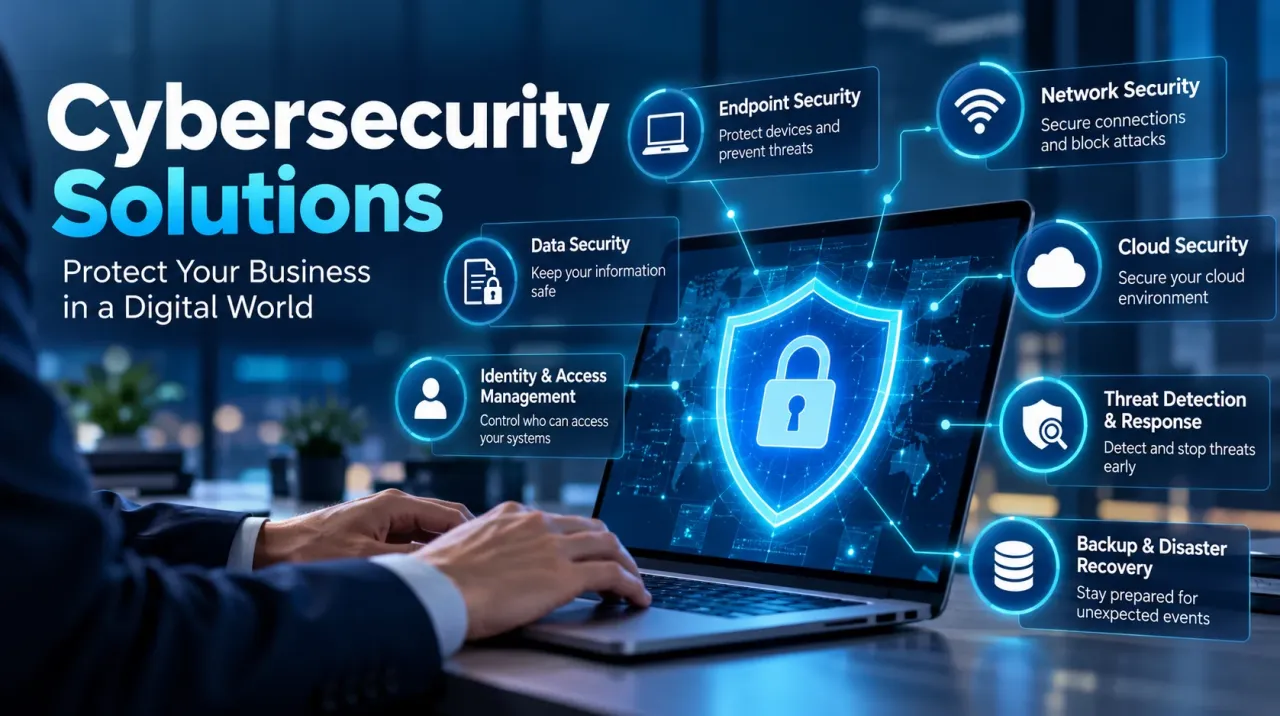
Different security controls address different risks. The following categories provide a useful starting point for evaluating your company's needs.
1. Endpoint Security Solutions
Endpoints include laptops, desktops, mobile devices and servers used to access company systems. A compromised device can expose business email, stored documents and connected applications.
Endpoint security solutions include antivirus software, endpoint detection and response (EDR), device management and application controls.
When evaluating products, ask whether they can detect suspicious behaviour, alert the right people and support the investigation of a compromised device. Also establish who is responsible for reviewing alerts and taking action.
For a business with remote employees, device protection should be combined with regular software updates and secure access to company applications.
2. Network Security Solutions
Network protection establishes rules for how devices and applications connect, helping restrict unauthorised access and suspicious traffic moving into or across business systems.
Common measures include firewalls, secure Wi-Fi, network segmentation, intrusion detection and secure remote access.
Start by checking whether guest devices can reach internal business systems, whether administrative interfaces are unnecessarily exposed and whether former employees or suppliers still have access.
Separating guest Wi-Fi from business systems and removing unnecessary network permissions can reduce avoidable exposure.
Larger organisations may require centralised network policies across multiple offices, while smaller businesses may begin with secure router configuration, firewall rules and protected remote access.
3. Data Security Solutions
Data security focuses on protecting information as it is collected, stored, accessed, shared and eventually deleted.
Depending on the business, useful controls include encryption, access permissions, data classification, data loss prevention and protected backups.
Identify the business information that would create the greatest problems if it were stolen, disclosed or lost. Examples include transaction histories, customer details, employee records, legal documents and proprietary business materials.
Then determine who genuinely needs access, where copies are stored and how permissions are removed when employees leave.
This exercise often reveals weaknesses that cannot be solved simply by purchasing another software product.
4. Cloud Security Solutions
Cloud services make it easier to collaborate and scale business operations, but insecure configurations and excessive permissions can expose sensitive information.
Cloud security solutions may include multifactor authentication, identity management, configuration monitoring, encryption and workload protection.
Businesses should understand the responsibilities shared with their cloud providers. A provider may secure its underlying infrastructure, but customers still need to manage their accounts, application permissions and information-sharing settings appropriately.
Review cloud access whenever new applications are introduced, employee responsibilities change or sensitive data moves between services.
5. Business Email Security
Email supports invoices, customer communications, password resets and supplier instructions. This makes it an attractive target for phishing and impersonation attacks.
Business email security solutions may include spam filtering, malicious-link detection, attachment scanning and email-domain authentication.
Technical controls should be supported by clear procedures. For example, employees should independently verify unexpected payment requests or supplier bank-account changes before transferring money.
SPF, DKIM and DMARC are email authentication technologies that can help reduce certain forms of spoofing when configured correctly. They should form part of a broader email security approach.
6. Identity and Access Management
Identity and access management (IAM) controls who can use business systems and what they are allowed to do.
Useful safeguards include multifactor authentication (MFA), strong unique passwords, role-based access, privileged account protection and regular access reviews.
Prioritise email, cloud administration, financial applications and other accounts that could cause significant damage if compromised.
For example, a marketing employee may need access to website analytics but not unrestricted access to customer payment records. Limiting permissions reduces the potential impact of an account compromise.
7. Backup and Recovery Solutions
A reliable recovery copy can bring critical files back after deletion, hardware problems or ransomware damage. To make that possible, keep backup copies protected from unauthorised changes and test whether the stored data can actually be recovered.
Maintain protected copies of critical information and consider offline or immutable backups where appropriate. Test restoration rather than assuming that a successful backup notification means the recovery process works.
Identify which systems must return first. An online retailer may prioritise order processing and customer support, while a professional services company may prioritise access to essential client documents.
Write down the steps employees should follow during recovery, name the person responsible for each task and schedule regular restoration tests to confirm the process works.
Regular website maintenance, security updates and backup verification are essential for protecting business websites. Learn more about website maintenance best practices.
How to Choose the Right Cybersecurity Solutions
The best security setup is the one that addresses your actual risks and can be maintained over time.
Step 1: Conduct a Cybersecurity Risk Assessment
Start by listing your important systems, business information, existing security controls and potential weaknesses.
Ask these questions:
Which business operations would be affected most if a critical system suddenly stopped working?
Where is sensitive customer or financial information stored?
Which accounts have administrator privileges?
Are critical applications receiving security updates?
Are backups protected and tested?
Who would respond if a serious incident occurred?
A cybersecurity risk assessment helps identify gaps and prioritise them according to their likelihood and potential impact.
NIST Cybersecurity Framework 2.0 organises cybersecurity work into six functions: Govern, Identify, Protect, Detect, Respond and Recover. Businesses can use this structure to assign responsibilities, assess exposure and review how they prepare for and handle security incidents over time.
Step 2: Prioritise Risks Before Buying Software
Decide what to fix first by considering the damage a weakness could cause, how easily it might be exploited and which protections are already working. This helps direct limited security budgets towards the risks that matter most.
| Risk to investigate | Possible impact | Practical first action |
|---|---|---|
| Email accounts without MFA | Account takeover or fraudulent communication | Enable MFA and review access |
| Backups never tested | Extended downtime or data loss | Test restoration of critical files |
| Outdated website components | Exposure to known vulnerabilities | Review software and apply appropriate updates |
| Excessive cloud permissions | Unauthorised access to business information | Review sharing settings and permissions |
| No incident response plan | Confusion and delayed decisions | Assign responsibilities and document escalation |
This is an initial checklist, not a formal risk rating. The actual priority of each issue depends on your systems, exposure and business impact.
Step 3: Evaluate Cybersecurity Providers
If you need external assistance, compare providers on their actual capabilities and deliverables rather than broad marketing claims.
Ask prospective providers:
What exactly is included in the proposed service?
Which systems, devices and platforms are supported?
Who reviews alerts and investigates incidents?
What response times are agreed in writing?
Who is responsible for implementing fixes?
How will findings and remediation be documented?
What additional or recurring charges apply?
How will credentials and confidential information be handled?
Request a written scope of work that includes responsibilities, exclusions and ongoing support.
Routine website maintenance and dedicated cybersecurity services are not always the same. Review the provider’s proposal to establish which activities are covered, such as security assessments, suspicious-activity monitoring, incident support and continuous protection. Ask for any exclusions and additional charges to be documented before work begins.
Businesses should also ensure that their websites are built with suitable technologies, secure configurations and ongoing support. Explore DK TechnoLab's web development services.
Step 4: Compare Long-Term Costs and Integration
Security products need to work with existing systems and be maintained properly.
Review licensing, implementation, monitoring, training, integration and support costs. Consider whether your team has the expertise and time to operate each solution.
A sophisticated product may create additional work if nobody is responsible for reviewing its alerts or applying its recommendations.
Choose solutions that meet your requirements, integrate with your technology and can be managed consistently.
Step 5: Prepare an Incident Response Plan
Even organisations with preventive controls can experience security incidents.
Your plan should identify who receives incident reports, who makes decisions, which systems may need to be isolated and how recovery will be coordinated.
It should also address communications, evidence preservation and applicable reporting obligations.
Run a short exercise based on a realistic scenario, such as a compromised email account or an unavailable website. Record what worked, what was unclear and which improvements need an owner.
Cybersecurity Solutions for Small Businesses and Enterprises
Small Businesses and Startups
Smaller organisations can often make meaningful progress by prioritising a manageable set of controls:
MFA for email and critical accounts.
Endpoint protection and security updates.
Protected, tested backups.
Secure website and cloud configurations.
Restricted user permissions.
Employee awareness and a basic incident response plan.
These measures create a foundation without requiring a large security department.
Medium-Sized and Enterprise Businesses
As IT environments grow, security requirements may extend to organisation-wide access controls, separated network zones, structured vulnerability remediation and tools that correlate security events. Some businesses may also require endpoint detection and response (EDR) or an external managed detection and response (MDR) provider, depending on their risk and staffing needs.
They may also need documented security policies, supplier reviews and structured incident reporting.
The correct combination depends on the organisation's systems, information, operating requirements and risk tolerance—not just its employee count.
How Much Do Cybersecurity Solutions Cost?
There is no universal price for cybersecurity solutions for businesses. Costs depend on the number of users and devices, infrastructure complexity, implementation requirements and level of support.
Important cost factors include:
Software licensing: Per-user, per-device or usage-based fees.
Implementation: Configuration, integration and migration.
Risk assessment: Identifying and prioritising weaknesses.
Remediation: Correcting vulnerabilities and insecure settings.
Monitoring: Reviewing alerts and investigating suspicious activity.
Incident response: Availability and scope of emergency support.
Ongoing maintenance: Updates, reviews and operational support.
When comparing quotations, separate one-time charges from recurring fees. Check what is excluded, who will perform remediation and whether after-hours support is included.
Instead of selecting the cheapest package, compare each proposal against the risks identified in your assessment. This helps direct spending towards genuine business needs rather than features that may never be used.
Cybersecurity Considerations for Businesses in India
Businesses operating in India should review cybersecurity requirements relevant to their activities, sector, contracts and handling of personal information.
CERT-In publishes official cybersecurity directions and related guidance. Businesses can consult the official CERT-In directions and FAQs to understand requirements that may apply to their circumstances.
Organisations serving international customers may also need to consider relevant privacy laws, contractual obligations and sector-specific requirements in other jurisdictions.
Purchasing security software does not automatically establish compliance. Organisations may need appropriate controls, documented processes and evidence that applicable requirements are being met.
For legal or regulatory decisions, obtain advice from a qualified professional familiar with your business and its operating locations.
A Practical 30-Day Cybersecurity Improvement Plan
This schedule helps organise an initial review. Adapt it to your risk assessment; a serious vulnerability may require immediate action.
Week 1: Identify
List critical systems, accounts and business information.
Review administrator access and inactive accounts.
Identify outdated software and obvious security gaps.
Record the likely impact of losing each critical system.
Week 2: Protect
Enable MFA on priority accounts.
Review cloud sharing settings and user permissions.
Apply relevant security updates.
Check website, email and endpoint protections.
Week 3: Recover
Verify that critical data is backed up.
Test restoring selected files or systems.
Document incident contacts and escalation responsibilities.
Identify dependencies that could delay recovery.
Week 4: Review
Address the highest-priority outstanding risks.
Assign an owner to each important security control.
Record unresolved issues and review dates.
Decide whether specialist assessment or additional support is needed.
At the end of the month, review which actions were completed, which risks remain and who owns the next steps. A schedule is useful only when actions are tracked and maintained.
Conclusion: Choose Cybersecurity Solutions That Fit Your Business
The right cybersecurity strategy begins with understanding what your business cannot afford to lose. That might be customer information, business email, a website, financial records or the applications employees need to serve customers.
Once those priorities are clear, you can select suitable controls, address the most significant weaknesses and establish a process for maintaining security as the business grows.
The strongest approach combines prevention, detection, response and recovery. It also assigns responsibility for keeping controls effective rather than treating cybersecurity as a one-time installation.
Need Help with Your Business Website or Application?
DK Technolab provides website development, mobile application development and ongoing website maintenance, including security updates and backups. If your requirement concerns a business website or digital application, contact the team to discuss the scope of support available. Specialist services such as penetration testing or managed security monitoring should be confirmed separately before engagement.
Contact DK Technolab to discuss your business website or application requirements.
Frequently asked questions

Written by the DkTechnoLab Team
Our Surat-based team of developers, designers and marketers has delivered 1250+ projects for 900+ clients since 2015. We write practical guides to help businesses make smarter technology decisions.
About us